
REST API Design: A Practical Guide to Principles, Patterns, and Examples
Learn how to design consistent, secure, and developer-friendly REST APIs: REST principles, resource naming, HTTP methods, status codes, versioning, pagination, and a real-world case study.
Panji Ihsanudin Fajri
19 min read4 reads

Contents
- What Is a REST API?
- How a REST API Works
- Why Good REST API Design Matters
- Core REST API Design Principles
- Client-server
- Stateless
- Cacheable
- Uniform interface
- Layered system
- Code on demand (optional)
- Designing Consistent URLs and Resources
- Naming rules that hold up
- When breaking the rules is fine
- HTTP Methods and Status Codes: Use Them Properly
- Methods and their properties
- Status codes worth memorizing
- Versioning, Pagination, Filtering, and Sorting
- Versioning: plan it before you need it
- Pagination: never return "everything"
- Filtering, sorting, and field selection
- Consistent Response Formats and Error Handling
- One envelope for everything
- Errors that actually help
- Security: Authentication, Authorization, and Rate Limiting
- Pick the right authentication mechanism
- Authorization: authentication isn't authorization
- Rate limiting and quotas
- Minimum security checklist
- Case Study: Designing an E-Commerce API
- Endpoint list
- Checkout flow example
- Common REST API Design Mistakes
- FAQ
- Does a REST API have to use JSON?
- When should I use PUT vs PATCH?
- What's the safest way to version an API?
- Is HATEOAS required for an API to count as REST?
- How much data should one page return?
- Conclusion
Nearly every modern application talks through a REST API: a mobile app fetching a product catalog, a web dashboard saving a report, a third-party service pulling customer data. The problem is that plenty of APIs are designed to merely work — inconsistent endpoints, status codes used at random, error messages that help nobody. Integration gets expensive, bugs pile up, and every small change feels risky.
This is a systematic, practical guide to REST API design. You'll learn the core REST principles, how to name resources and structure URLs consistently, how to use HTTP methods and status codes the way they were meant to be used, versioning and pagination strategies, uniform error formats, and security essentials. It closes with a full case study: designing an e-commerce API from scratch.
Summary: A good REST API treats URLs as resources (nouns), not actions. HTTP methods and status codes have standard meanings — honor them. Consistent response and error formats save every API consumer hours of guesswork. Versioning, pagination, and rate limiting are day-one requirements, not later additions. Security (HTTPS, authentication, authorization) is non-negotiable.
What Is a REST API?
REST (Representational State Transfer) is an architectural style for building web services, introduced by Roy Fielding in his doctoral dissertation in 2000. A REST API follows those architectural principles and communicates over HTTP: a client sends a request to a URL representing a resource, the server processes it, and returns a representation of that resource — usually as JSON.
Three terms deserve precision. A resource is the concept or object you expose: a user, a product, an order. A representation is the resource's state at a point in time — the JSON payload traveling back and forth. State transfer means each request carries its own context; the server keeps no memory of previous requests.
How a REST API Works
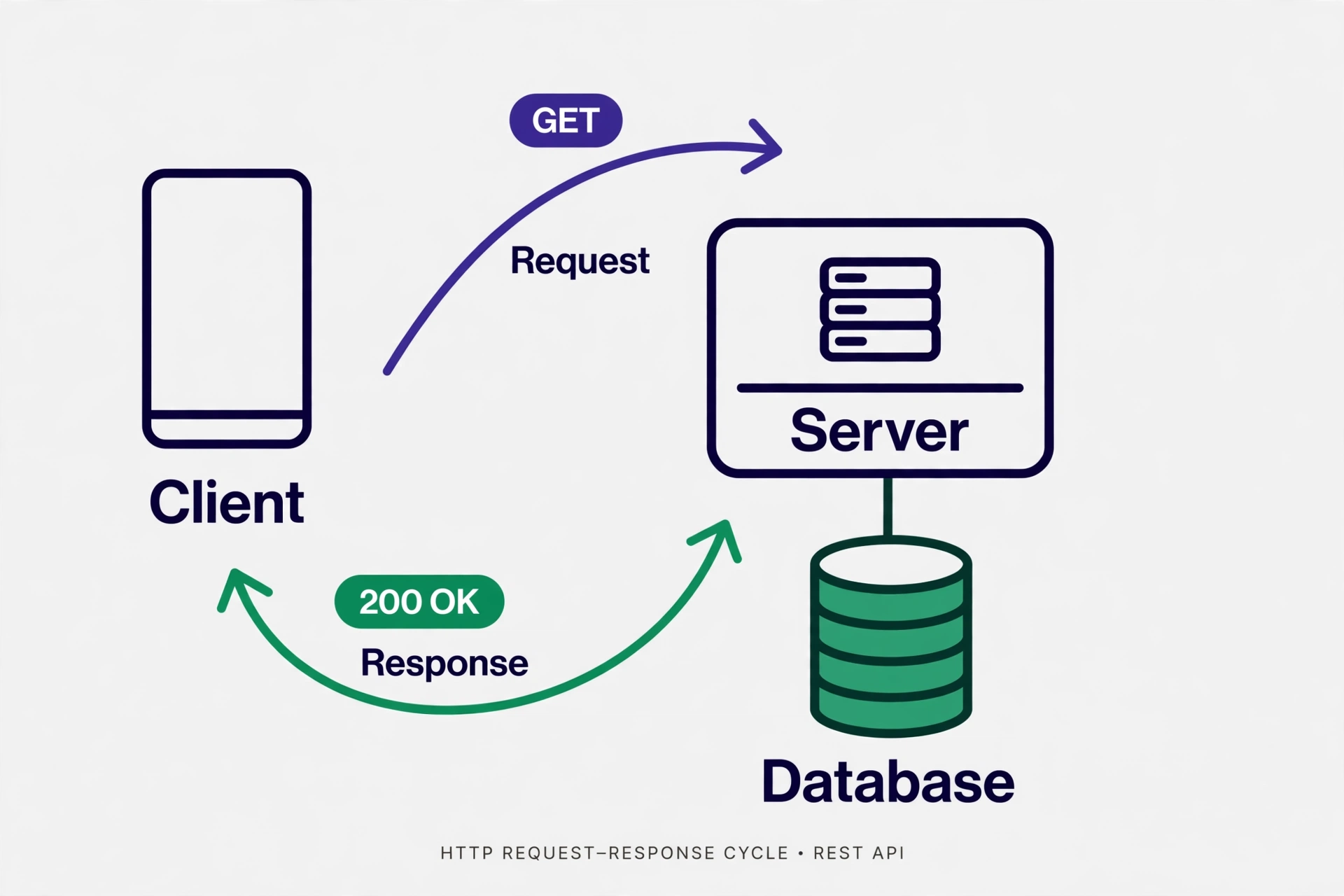
The flow never changes. The client builds an HTTP request consisting of a method (GET, POST, and friends), a resource URL, headers (such as Authorization and Content-Type), and an optional body. The server receives it, runs the business logic, and returns an HTTP response with a status code, headers, and a body.
Here's what that exchange looks like on the wire:
GET /v1/products/42 HTTP/1.1
Host: api.shop.example
Authorization: Bearer eyJhbGciOi...
Accept: application/json
HTTP/1.1 200 OK
Content-Type: application/json
Cache-Control: max-age=3600

{
  "id": 42,
  "name": "Arabica Coffee 200g",
  "price": 85000,
  "stock": 120
}
Two things stand out. First, the request is stateless: the auth token travels with every request because the server remembers nothing about previous ones. Second, the response is self-descriptive: the 200 OK status and the Content-Type header tell the client how to interpret the body without extra documentation.
Why Good REST API Design Matters
An API is a contract. Once published and consumed by mobile apps, web dashboards, business partners, or automation scripts, changing it becomes expensive. Bad design doesn't disappear — it compounds into technical debt that you repay with every new integration.
Four concrete reasons the investment pays off:
- Lower integration cost. A consistent API is predictable. Developers who've used one endpoint don't need to re-read the docs for the next.
- Fewer bugs. Correct status codes let clients handle failure properly — retry on
503, show a login form on401— instead of guessing from the response body. - Safe evolution. Versioning planned from the start lets you ship v2 without breaking legacy apps still on v1.
- An increasingly diverse consumer base. Today's API consumers aren't only human-built apps — AI agents call APIs through tool use too. Consistent, documented responses make your API agent-ready out of the box. If you're building AI features on top of your API, the complete guide to prompt engineering covers how to design reliable instructions for language models.
Core REST API Design Principles
Fielding defined six architectural constraints for REST. You don't need to memorize them for an exam, but understanding them leads to better design decisions.
Client-server
The client (user-facing app) and server (data provider) are separated and evolve independently. The consequence: never leak server internals to clients — database table names and stack traces have no place in API responses.
Stateless
Every request must contain all the information the server needs. Don't rely on sessions stored in server memory. In practice: send the auth token in the Authorization header on every request. This makes horizontal scaling trivial, since any instance can serve any request.
Cacheable
Responses must declare themselves cacheable or not via headers like Cache-Control and ETag. The rule of thumb: GET requests returning rarely-changing data may be cached; POST may not. Correct caching can slash server load dramatically without touching a line of business logic.
Uniform interface
The constraint with the biggest day-to-day design impact, in four parts:
- Resource identification via URLs. Every resource gets a unique URL, e.g.
/products/42. - Manipulation through representations. Clients change resources by sending their representation (JSON), not procedural commands.
- Self-descriptive messages. Standard methods, headers, and status codes already explain what a message means.
- HATEOAS (Hypermedia as the Engine of Application State): responses include links to related actions. full HATEOAS is rarely implemented in public APIs because of the added complexity — but including related links like
"self"or"next"in paginated responses is a healthy practice.
Layered system
The client shouldn't care whether it's talking directly to your server or through a load balancer, CDN, or API gateway. Design with that assumption: don't depend on the client IP for business logic, and handle headers like X-Forwarded-For at the infrastructure layer, not in application code.
Code on demand (optional)
The only optional constraint: the server may send executable code to the client (e.g. JavaScript). Barely relevant to modern REST APIs — just know it exists.
Designing Consistent URLs and Resources
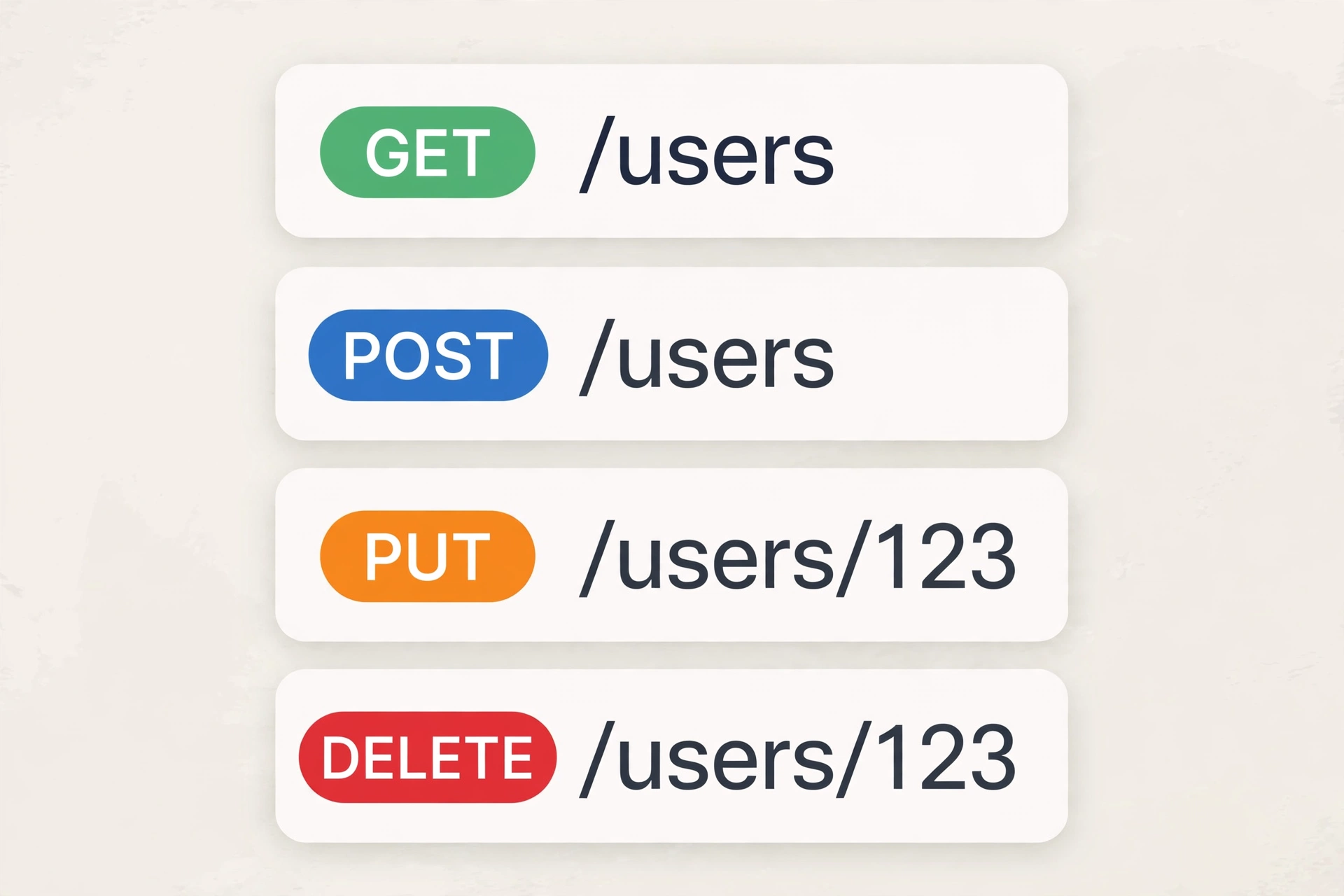
The URL is your API's face. The golden rule is simple: URLs name resources (nouns), not actions (verbs). Actions are already expressed by the HTTP method. Once you commit to that rule, most naming decisions make themselves.
Naming rules that hold up
- Plural nouns, never verbs.
GET /usersis right;GET /getUsersis wrong. To create a user:POST /users, notPOST /createUser. - All lowercase. URLs are case-sensitive on many servers.
/productsand/Productscan be treated as different resources — avoid the ambiguity from day one. - Kebab-case for compound words.
/order-items, not/orderItemsor/order_items. Pick one style and apply it across the whole API. - Hierarchy for relationships.
/users/123/ordersmeans "orders belonging to user 123". Cap nesting at 2–3 levels; beyond that, prefer query parameters or separate endpoints. - Query parameters for filtering, sorting, and search — never as path segments.
GET /products?category=coffee&sort=priceis right;GET /products/category/coffee/sort/priceis wrong. - Be consistent about trailing slashes. Pick one (
/usersor/users/) and treat the other as a redirect or 404 — don't let both quietly live as different resources.
| Wrong | Right | Why |
|---|---|---|
GET /getAllProducts |
GET /products |
Actions belong to the method, not the URL |
POST /products/delete/42 |
DELETE /products/42 |
The DELETE method already states the intent |
/Users/42 |
/users/42 |
Avoids case-sensitivity issues |
/products/42/updatePrice |
PATCH /products/42 |
Partial updates go in the body, not the URL |
/v1/users/123/orders/456/items |
/v1/orders/456/items |
Nesting too deep |
When breaking the rules is fine
Some operations genuinely don't map to CRUD — "resend verification email" or "calculate shipping cost". The widely accepted pattern is an action sub-resource: POST /users/123/verification-emails or POST /shipping-quotes. Still nouns, still POST. What's off the table is pure RPC like POST /sendVerificationEmail.
HTTP Methods and Status Codes: Use Them Properly
HTTP already ships a complete vocabulary for operations and outcomes. Using it correctly makes your API understandable without documentation.
Methods and their properties
| Method | Purpose | Safe | Idempotent |
|---|---|---|---|
GET |
Read a resource | Yes | Yes |
POST |
Create a resource / trigger an action | No | No |
PUT |
Replace an entire resource | No | Yes |
PATCH |
Modify part of a resource | No | Yes* |
DELETE |
Remove a resource | No | Yes |
Safe means it doesn't change server state. Idempotent means repeating the same request yields the same result — a property that makes automatic retries safe on flaky networks. PATCH is idempotent as long as the operation is "set this value" rather than "increment by one".
In practice: PUT /products/42 expects a body with the complete product representation; omitted fields are treated as cleared. PATCH /products/42 with {"price": 90000} changes only the price. Document this difference explicitly — misunderstanding it is a classic source of bugs.
Status codes worth memorizing
Don't return 200 OK for everything. The status code is part of the contract:
| Code | Meaning | When to use it |
|---|---|---|
200 OK |
Success | GET, PUT, PATCH, DELETE returning a body |
201 Created |
Resource created | Response to POST that created a resource; include a Location header |
204 No Content |
Success, no body | DELETE returning nothing |
400 Bad Request |
Invalid request | Failed validation, malformed JSON |
401 Unauthorized |
Not authenticated | Missing, expired, or wrong token |
403 Forbidden |
No access | Authenticated but not permitted |
404 Not Found |
Resource doesn't exist | ID not found |
409 Conflict |
State conflict | Email already registered, insufficient stock |
422 Unprocessable Entity |
Semantically invalid | Syntactically fine but violates business rules |
429 Too Many Requests |
Rate limit exceeded | Include a Retry-After header |
500 Internal Server Error |
Server failure | Never leak internals to the client |
401 vs 403 trips people up constantly: 401 means "I don't know who you are" (authentication), 403 means "I know who you are, but you can't" (authorization). For 422 vs 400: 400 is for requests that can't even be understood (broken JSON), 422 for requests that are syntactically valid but break business rules. The MDN HTTP status reference and RFC 9110 on HTTP semantics cover the full details.
Versioning, Pagination, Filtering, and Sorting
These three separate toy APIs from production APIs. They all look trivial until thousands of clients depend on yours.
Versioning: plan it before you need it
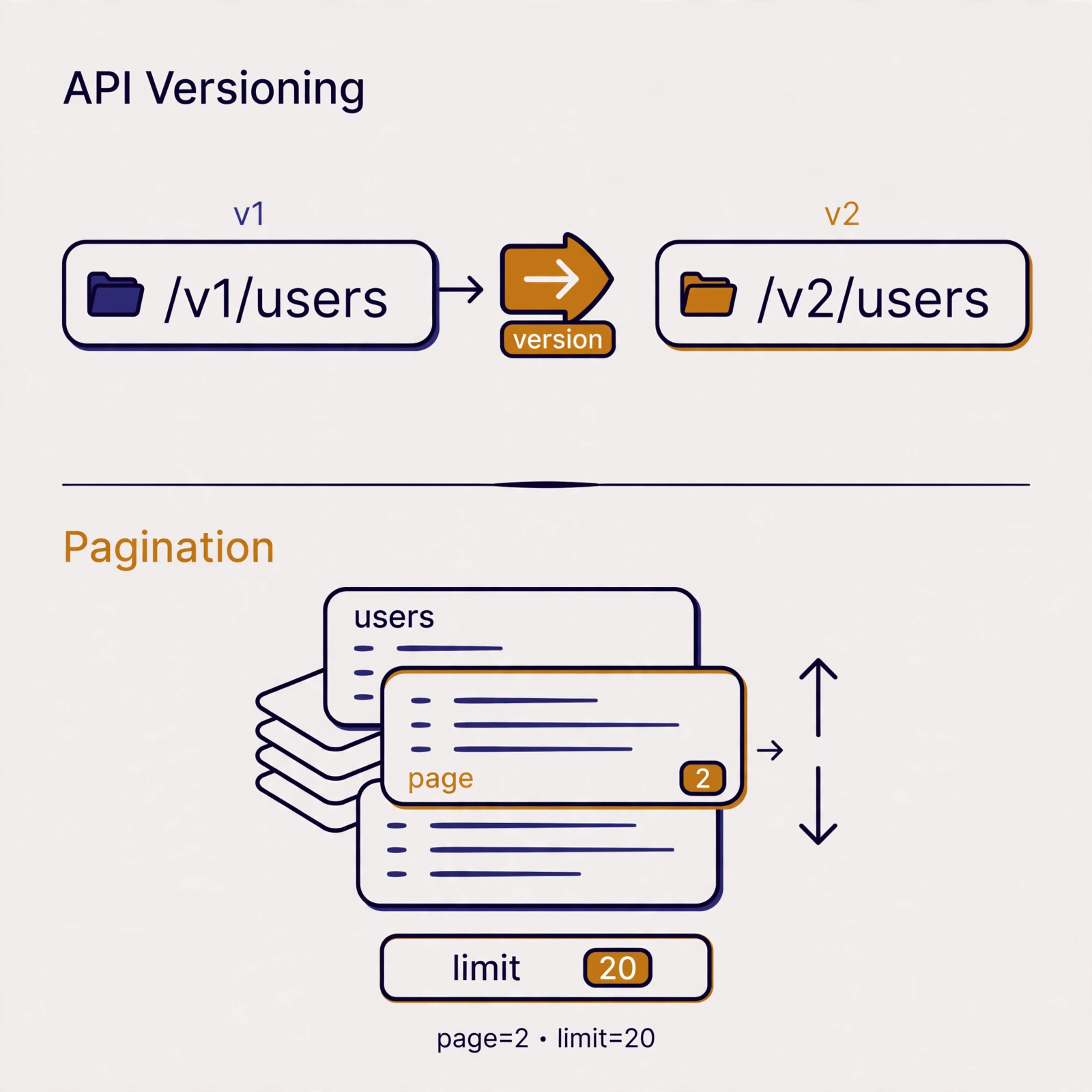
Once an API is public, you can't change the contract at will. Versioning gives you room to evolve without breaking existing clients.
| Strategy | Example | Strengths | Weaknesses |
|---|---|---|---|
| URL path | /v1/products, /v2/products |
Most explicit, easy to cache and debug | URL changes between versions |
| Header | Accept: application/vnd.shop.v2+json |
URLs stay clean | Hard to try in a browser, less visible |
| Query param | /products?version=2 |
Easy to implement | Clutters the query string, awkward caching |
Practical recommendation: version in the URL path. It's what Stripe, GitHub, and Twilio do, because it's the most explicit — the version shows up in logs, routes cleanly at the gateway, and confuses no one. Start with /v1 on day one, even before v2 exists. The ground rules: contract-breaking changes (removing a field, changing a type, altering behavior) require a major version bump; adding new optional fields can land in the current version.
One more thing: don't keep too many versions alive. Announce a sunset schedule (say, v1 retired 12 months after v2 ships) and return a Sunset header on old-version responses so clients can prepare.
Pagination: never return "everything"
An unpaginated GET /products is a time bomb. Today it's 100 rows; next year it's 10 million rows and a single request brings the database to its knees. Always paginate collections, with sane defaults (say, 20–50 items) and a hard maximum (say, 100).
Two common approaches:
- Offset-based (
?page=2&limit=20): simple, supports jumping to any page. The catch: inserts or deletes mid-pagination shift results — items get skipped or duplicated. - Cursor-based (
?cursor=eyJpZCI6NDJ9&limit=20): stable for large, fast-changing datasets because the marker is position-based rather than page-number-based. Slightly more work on the client.
Offset-based is fine for most cases. For feeds, timelines, or million-row tables, go cursor-based. Either way, a paginated response must include metadata:
{
  "success": true,
  "data": [
    { "id": 41, "name": "Robusta Coffee 200g", "price": 65000 },
    { "id": 42, "name": "Arabica Coffee 200g", "price": 85000 }
  ],
  "meta": {
    "page": 2,
    "limit": 20,
    "total_items": 1840,
    "total_pages": 92
  },
  "links": {
    "self": "/v1/products?page=2&limit=20",
    "next": "/v1/products?page=3&limit=20",
    "prev": "/v1/products?page=1&limit=20"
  },
  "error": null
}
Filtering, sorting, and field selection
Let clients ask for exactly what they need via query parameters — it eliminates whole categories of special-purpose endpoints:
GET /v1/products?category=coffee&min_price=50000&sort=-price,name&fields=id,name,price
Common conventions: sort=-price means descending by price (the minus sign), fields=id,name,price limits returned fields (sparse fieldsets) to save bandwidth — significant for mobile apps. For free-text search, a single q or search parameter usually suffices: GET /v1/products?q=arabica.
Consistent Response Formats and Error Handling
Format consistency is the single biggest difference between an API that's pleasant to use and one that's miserable. Clients should be able to write one function that handles every response your API produces.
One envelope for everything
Use a single structure for all success and failure responses:
{
  "success": true,
  "data": { "id": 42, "name": "Arabica Coffee 200g" },
  "meta": { "request_id": "req_9f2c1a" },
  "error": null
}
request_id looks minor but pays for itself in debugging: the client quotes it in a bug report, and you find the trace in server logs instantly. Consistent responses also make your API trivial for AI agents to parse — a principle that aligns with good prompt engineering practices, where predictable structure makes models more reliable.
Errors that actually help
A good error answers three questions: what went wrong, why, and how to fix it. The recommended format:
{
  "success": false,
  "data": null,
  "meta": { "request_id": "req_9f2c1a" },
  "error": {
    "code": "INSUFFICIENT_STOCK",
    "message": "Insufficient product stock for the requested quantity.",
    "details": [
      { "field": "quantity", "issue": "Only 3 in stock, 10 requested." }
    ]
  }
}
The rules: code is a constant string client code can switch on (OUT_OF_STOCK, VALIDATION_FAILED), message explains it for humans, and details breaks down per-field validation errors. Never return raw stack traces or database error messages to clients — they expose internals and help nobody.
Security: Authentication, Authorization, and Rate Limiting
A public API without proper security is an open invitation. The standard patterns are well established.
Pick the right authentication mechanism
| Mechanism | How it works | Fits |
|---|---|---|
| API key | Header X-API-Key: ... |
Simple server-to-server integration, webhooks |
| Bearer token (JWT) | Header Authorization: Bearer ... |
Web/mobile apps with user login |
| OAuth 2.0 | Standard authorization flow + refresh tokens | Public third-party APIs, "sign in with Google" |
For internal APIs or MVPs, an API key or JWT is enough. For APIs consumed by outside developers, offer OAuth 2.0. One hard rule: tokens never travel in the query string — URLs end up in server logs, browser history, and analytics tools. Always use headers.
Authorization: authentication isn't authorization
Being logged in doesn't mean access to everything. Enforce ownership checks on every endpoint: GET /users/123/orders must reject user 456 with 403 Forbidden, not rely on "the URL is hard to guess". This is Insecure Direct Object Reference (IDOR), a regular on the OWASP API Security Top 10 — a list of API security risks worth reading end to end.
Rate limiting and quotas
Cap requests per client (say, 1000 requests/hour per API key) to protect the server from buggy clients and abuse. When the limit is hit, return 429 Too Many Requests with a Retry-After: 60 header so the client knows when to try again. Also send informative headers on normal responses:
HTTP/1.1 200 OK
X-RateLimit-Limit: 1000
X-RateLimit-Remaining: 997
X-RateLimit-Reset: 1728902400
Minimum security checklist
- HTTPS on every endpoint — no exceptions, including in documentation examples.
- Validate and sanitize all input; never trust client data.
- Don't expose sequential IDs where data is sensitive — consider UUIDs or random IDs.
- Set standard security headers and restrict CORS to only the origins you need.
- Log every authentication failure, but never log tokens or passwords.
Case Study: Designing an E-Commerce API
Let's apply everything to one complete example: an API for an online store with a product catalog, cart, checkout, and order history.
Endpoint list
| Method | Endpoint | Description |
|---|---|---|
GET |
/v1/products |
Product list (paginated, filterable, sortable) |
GET |
/v1/products/{id} |
Single product detail |
POST |
/v1/carts/items |
Add item to cart |
GET |
/v1/carts |
Active cart contents |
DELETE |
/v1/carts/items/{item_id} |
Remove item from cart |
POST |
/v1/orders |
Checkout: create order from cart |
GET |
/v1/orders |
User's order history |
GET |
/v1/orders/{id} |
Single order detail |
POST |
/v1/orders/{id}/cancellation |
Cancel an order (action sub-resource) |
Notice the consistency: plural nouns everywhere, nesting capped at two levels, the non-CRUD action ("cancellation") as a sub-resource under POST.
Checkout flow example
The client creates an order from the cart:
POST /v1/orders HTTP/1.1
Host: api.shop.example
Authorization: Bearer eyJhbGciOi...
Content-Type: application/json

{
  "shipping_address_id": "addr_8f3k",
  "payment_method": "bank_transfer"
}
A successful response returns 201 Created with a Location header:
HTTP/1.1 201 Created
Content-Type: application/json
Location: /v1/orders/ord_5x2m

{
  "success": true,
  "data": {
    "id": "ord_5x2m",
    "status": "awaiting_payment",
    "total": 170000,
    "expires_at": "2026-10-16T18:46:44+07:00",
    "items": [
      { "product_id": 42, "name": "Arabica Coffee 200g", "quantity": 2, "price": 85000 }
    ]
  },
  "meta": { "request_id": "req_9f2c1a" },
  "error": null
}
And when stock runs short, the API responds with an error that client code can handle deterministically:
HTTP/1.1 409 Conflict
Content-Type: application/json

{
  "success": false,
  "data": null,
  "meta": { "request_id": "req_7d1b22" },
  "error": {
    "code": "INSUFFICIENT_STOCK",
    "message": "Insufficient product stock for the requested quantity.",
    "details": [
      { "field": "items[0].quantity", "issue": "Only 3 in stock, 10 requested." }
    ]
  }
}
The client only needs to check error.code === "INSUFFICIENT_STOCK" to show the right "out of stock" message — no string parsing required.
Common REST API Design Mistakes
- Verbs in URLs.
GET /getUserById?id=5ignores HTTP's entire vocabulary. Fix:GET /users/5. 200 OKfor everything. Wrapping errors in 200 forces clients to parse the body to detect failure — and breaks caching, monitoring, and automatic retries.- A different error format per endpoint. One endpoint returns
{"error": "..."}, another{"message": [...]}. Standardize one envelope across the API. - No pagination. An unbounded collection endpoint will explode as data grows. Add it on day one.
- Versioning as an afterthought. Adding
/v1after launch means migrating every client at once. Version from the start. - Secrets in the query string.
?api_key=xxxlands in logs and browser history. Move it to a header. - Returning too much data. A user response embedding full login history "just in case" slows mobile clients and leaks data. Offer
fields=selection. - No documentation. An API without an OpenAPI/Swagger spec forces integration by trial and error. Write the spec — tools generate interactive docs and client SDKs from it.
- Ignoring idempotency on writes. Without an idempotency key, retrying a
POST /ordersthat failed midway can create duplicate orders. For payment operations, accept anIdempotency-Keyheader and return the same response for the same key.
FAQ
Does a REST API have to use JSON?
Not strictly, but JSON is the sensible default: lightweight, supported by every language, human-readable. Negotiate other formats via the Accept header when there's a genuine need (e.g. application/xml for legacy integrations), but don't offer five formats without a reason.
When should I use PUT vs PATCH?
Use PUT when the client sends the complete replacement representation — missing fields are treated as cleared. Use PATCH for partial updates, like changing just the price. If in doubt and your API is simple, offer PATCH only and document it clearly.
What's the safest way to version an API?
Path-based versioning (/v1/, /v2/) is the most explicit and operationally simple: visible in logs, easy to route, obvious to new developers. Announce a retirement schedule for old versions and include a Sunset header so clients can prepare.
Is HATEOAS required for an API to count as REST?
In Fielding's theory, yes; in practice, almost no major public API implements it fully. What matters: URLs identify resources, methods and status codes are used by meaning, messages are self-descriptive. Including self/next/prev links on collections is a healthy compromise. A good reference is restfulapi.net.
How much data should one page return?
A default of 20–50 items with a maximum of 100 is a sane starting point for most cases. For large datasets or real-time feeds, consider cursor-based pagination so no items slip through as data changes.
Conclusion
Good REST API design comes down to discipline on the fundamentals: URLs name resources with nouns, HTTP methods and status codes are used by meaning, response and error formats stay uniform across endpoints, and versioning, pagination, and security are planned from day one rather than patched in later.
The highest-impact next step: audit one API you maintain today against the mistakes list above, then fix them one by one, starting with whatever consumers complain about most. And if your API will power LLM-based features — an agent ordering through your API, for instance — study prompt engineering techniques from basics to advanced so the instructions you give the model are as consistent as the API you designed. Microsoft's guide to REST API design is also worth reading as a second opinion.