The Complete Guide to Retrieval-Augmented Generation (RAG)
Learn RAG from the ground up: how the retrieval-augmented generation pipeline works, chunking, embeddings, vector databases, a Python tutorial, and production best practices.
Panji Ihsanudin Fajri
15 min read3 reads
Contents
- What Is Retrieval-Augmented Generation (RAG)?
- Why RAG Matters
- When RAG Is the Wrong Tool
- How RAG Works
- RAG Architecture Components
- Chunking: Splitting Documents the Right Way
- Embedding Models
- Vector Databases
- The Retriever: Beyond Top-K
- The Generator and Its Prompt
- Building Your Own RAG: A Python Tutorial
- RAG vs. Fine-Tuning vs. Prompt Engineering
- Applied Walkthrough: A Documentation Chatbot at Scale
- Common Mistakes and How to Avoid Them
- RAG Best Practices for Production
- FAQ
- Does RAG need a GPU?
- How much does running RAG cost?
- Does RAG work for non-English content?
- How is RAG different from regular search?
- When should I move from simple RAG to an advanced architecture?
- Conclusion
Ask a language model about your company's internal policies, an API released last month, or a regulation that changed this year, and it will answer with total confidence — sometimes correctly, sometimes inventing details wholesale. This is the hallucination problem, and retrieval-augmented generation (RAG) is the most widely used fix: before answering, the model searches your documents, then grounds its response in what it finds.
This guide covers RAG end to end: what it is, why it matters, how the pipeline works, the architecture components, a hands-on Python tutorial, how it compares to fine-tuning, an applied walkthrough, common mistakes, production best practices, and an FAQ.
Summary: RAG pairs document retrieval with a language model so answers are grounded in verifiable sources. The flow: documents are split into chunks, converted to embedding vectors, and stored in a vector database; at query time the system finds the most relevant chunks and passes them to the LLM as context. RAG is cheaper and more flexible than fine-tuning for data that changes often. Quality lives or dies on chunking strategy, embedding model choice, and retrieval evaluation.
What Is Retrieval-Augmented Generation (RAG)?
Retrieval-Augmented Generation (RAG) is an architecture that gives a language model access to external knowledge at inference time. Instead of relying on what the model "remembers" from training, it receives relevant document passages as additional context and generates an answer grounded in those passages.
The term comes from Retrieval-Augmented Generation for Knowledge-Intensive NLP Tasks (Lewis et al., 2020). Since then, RAG has become the standard pattern for documentation chatbots, internal company assistants, and question-answering over private data.
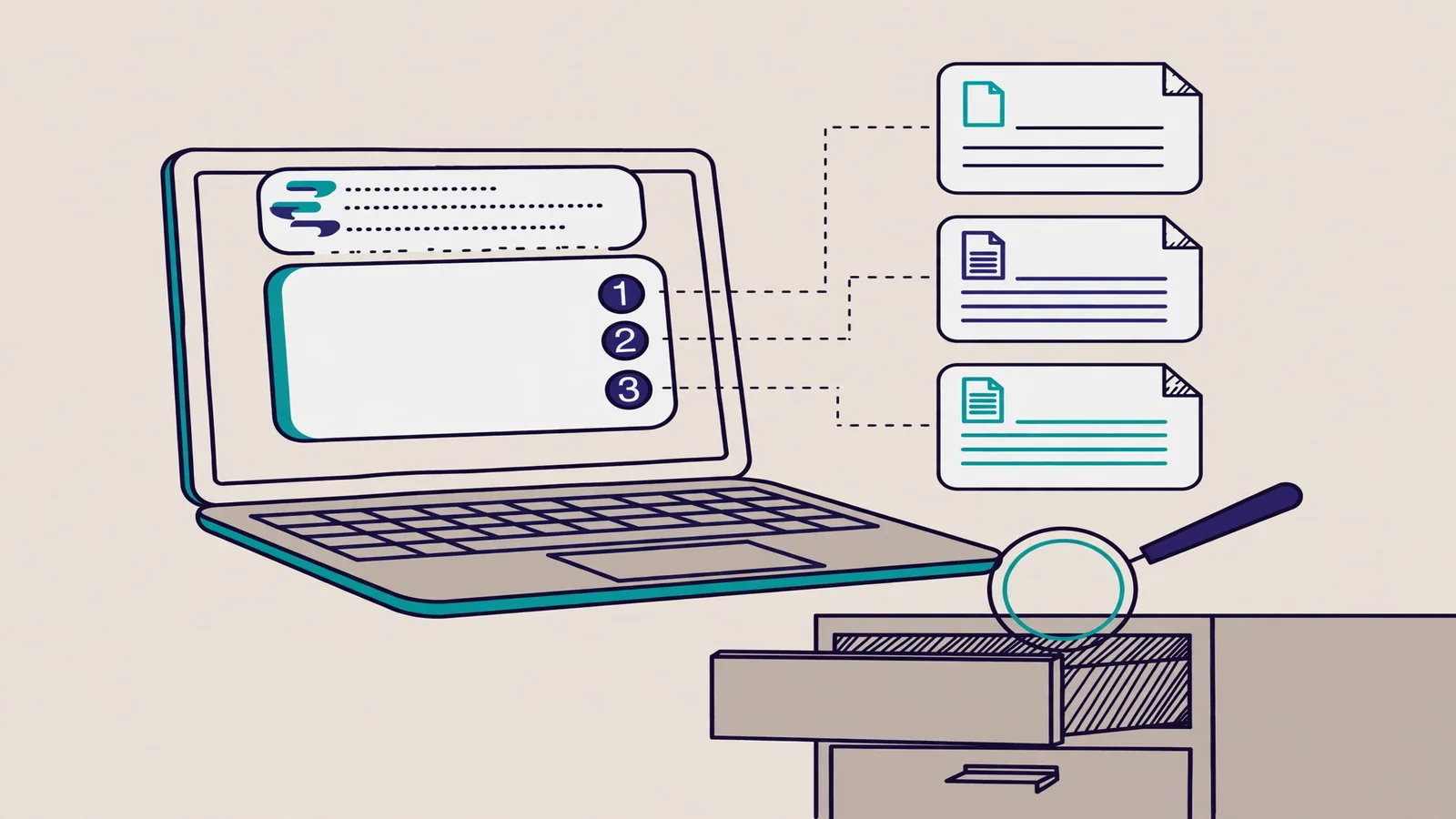
The intuition is straightforward. Ask a company chatbot, "What is the daily travel reimbursement limit?" Without RAG, the model answers from memory, possibly right, possibly quoting a 2019 policy. With RAG, the system retrieves the "Travel Reimbursement Policy 2025" document, finds the relevant clause, injects it into the prompt, and the model answers: "$150 per day, per the Travel Reimbursement Policy 2025, section 4." Every claim traces back to a source.
Why RAG Matters
RAG directly addresses three limitations of LLMs:
1. Stale knowledge. Models are trained up to a cutoff date and know nothing after it. RAG doesn't care when the model was trained, because the knowledge comes from documents you supply at query time.
2. Private data that must never enter training. Internal documents, customer knowledge bases, and code repositories can't (and shouldn't) go into a public model's training set. With RAG, documents stay in your infrastructure; only the passages relevant to a question reach the model.
3. Hallucination on factual questions. When a model doesn't know something, it tends to invent an answer with confidence. Handing it real document context suppresses this sharply: a well-instructed model will say "not found in the documents" instead of fabricating, provided the prompt asks for that behavior.
The practical effect: you can build an assistant that answers as if it had memorized thousands of pages of documentation, without retraining any model.
When RAG Is the Wrong Tool
RAG doesn't solve everything. If you need to change a model's tone, output format, or consistent behavior, that's the domain of prompt engineering and system prompts. If the model needs genuinely new reasoning patterns or deep domain expertise (say, a brand-new programming language), fine-tuning fits better. The full comparison is in "RAG vs. Fine-Tuning vs. Prompt Engineering" below.
How RAG Works
A RAG pipeline has two phases: indexing (run once, or whenever documents change) and retrieval + generation (run on every question).
Indexing phase:
- Raw documents (PDFs, Markdown, HTML, plain text) are cleaned and split into small pieces called chunks.
- Each chunk is converted into an embedding (a vector of numbers capturing the text's semantic meaning) using an embedding model.
- Chunks and their embeddings go into a vector database built for fast similarity search.
Query phase:
- The user's question is converted into an embedding with the same model.
- The vector database finds the chunks whose embeddings are closest, where "closest" means close in meaning, not just shared keywords.
- The top chunks (say, 3–5) are inserted into the prompt alongside the original question.
- The LLM reads that context and composes the answer.
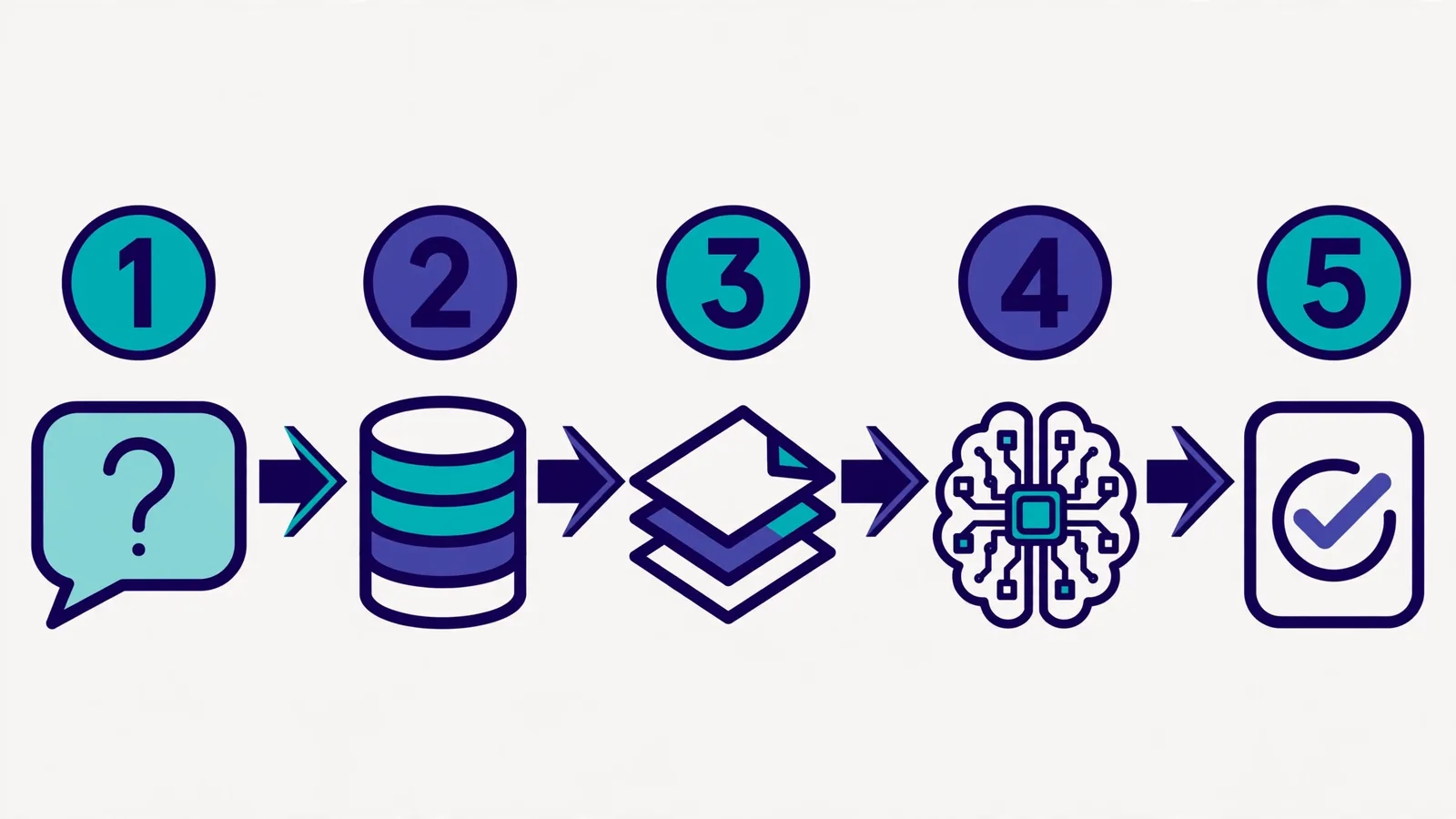
Step 2 of the query phase is the key insight: the search is semantic. "How do I reset my password?" matches a document titled "Account Recovery" even with zero words in common, because their embeddings sit near each other in vector space.
Under the hood, closeness is usually measured with cosine similarity, the angle between two vectors. A score of 1 means identical direction; 0 means unrelated. Modern vector databases (Pinecone, Weaviate, Qdrant, pgvector) compute this across millions of vectors in milliseconds using ANN (Approximate Nearest Neighbors) indexes.
RAG Architecture Components
Chunking: Splitting Documents the Right Way
Chunking is the highest-leverage decision people underestimate most. Oversized chunks drag noise into the context; undersized chunks sever meaning mid-thought.
Common strategies:
- Fixed-size chunking: cut every N tokens (e.g., 512) with 50–100 tokens of overlap. Simple and decent for generic prose.
- Recursive chunking: split on structure first (paragraphs, then sentences) so chunk boundaries follow natural meaning boundaries. A solid default in most cases.
- Semantic chunking: split where the topic shifts, detected from embedding drift between sentences. More expensive, but clean for long documents that mix topics.
- Document-aware chunking: respect the document's own structure (one code function per chunk, one Markdown section per chunk). Essential for codebases and technical docs.
Practical rule: start with recursive chunking at 512 tokens and 10–20% overlap, then measure. Don't guess — measure with retrieval evaluation (covered under best practices).
Embedding Models
The embedding model turns text into vectors, and your choice decides how well the system understands semantic similarity. Popular options:
| Model | Dimensions | Notes |
|---|---|---|
text-embedding-3-small (OpenAI) |
1,536 | Cheap, fast, enough for most cases |
text-embedding-3-large (OpenAI) |
3,072 | Higher accuracy, higher cost |
multilingual-e5-large |
1,024 | Open source, strong multilingual coverage |
bge-m3 |
1,024 | Open source, supports dense + sparse hybrid search |
For non-English content, multilingual models like E5 or BGE usually beat English-only ones. See the OpenAI embeddings guide and the E5 model card on Hugging Face for details.
One hard rule: the embedding model for indexing and querying must be identical. Vectors from two different models aren't comparable.
Vector Databases
A vector database stores millions of embeddings and serves similarity search in milliseconds. The choice depends on scale and where you operate:
- pgvector — a Postgres extension. The most pragmatic pick if your data already lives in Postgres and you're under a few million chunks.
- Qdrant / Weaviate — open source, self-hostable, mature metadata filtering.
- Pinecone — fully managed, zero ops. Their concept guide at Pinecone Learn: RAG is a clear read.
- Chroma — lightweight, popular for prototyping, runs locally.
For metadata, always store: source document, title, date, and page/section number. You'll use it for filtering ("search only 2025 documents") and for showing citations to users.
The Retriever: Beyond Top-K
A basic retriever grabs the K most similar chunks. In production, three upgrades deliver the biggest quality jumps:
- Hybrid search combines vector search (meaning) with BM25/keyword search (exact terms). This matters for code, clause numbers, and product names that must match literally.
- Reranking fetches 20–50 candidates with the fast search, then re-orders with a slower cross-encoder model to pick the best 5. Costly per query, but much more accurate.
- Query transformation rewrites or splits the user's question before searching. "How do I reset my password and change my email?" works better as two separate queries.
The Generator and Its Prompt
An LLM is only as good as its instructions. A RAG system prompt needs three things: an order to answer only from the provided context, a clear citation format, and defined behavior for insufficient context. A pattern that works:
"Answer only using the numbered context below. Cite the source number for every factual claim, e.g. [1]. If the answer isn't in the context, say 'I couldn't find the answer in the available documents' — do not invent one."
Crafting instructions like this is covered in depth in the prompt engineering guide; RAG and prompt engineering complement each other rather than compete.
Building Your Own RAG: A Python Tutorial
This section builds a minimal RAG pipeline from scratch so every piece stays visible. We'll use OpenAI for embeddings and chat, plus pure NumPy cosine search (no vector database), so nothing hides behind abstractions.
Install the dependencies:
pip install openai numpy
Step 1 — Prepare documents and chunk them. Simple paragraph-based recursive chunking:
def chunk_text(text: str, max_chars: int = 1500, overlap: int = 200) -> list[str]:
    """Split text into overlapping chunks on paragraph boundaries."""
    paragraphs = [p.strip() for p in text.split("\n\n") if p.strip()]
    chunks, current = [], ""
    for para in paragraphs:
        if len(current) + len(para) <= max_chars:
            current += ("\n\n" if current else "") + para
        else:
            chunks.append(current)
            # keep the tail as overlap for the next chunk
            current = current[-overlap:] + "\n\n" + para if len(current) > overlap else para
    if current:
        chunks.append(current)
    return chunks
Step 2 — Embed every chunk. One API call can process many texts at once (batching):
from openai import OpenAI
import numpy as np

client = OpenAI()

def embed(texts: list[str]) -> np.ndarray:
    """Return L2-normalized embeddings for a batch of texts."""
    resp = client.embeddings.create(model="text-embedding-3-small", input=texts)
    vecs = np.array([d.embedding for d in resp.data], dtype=np.float32)
    return vecs / np.linalg.norm(vecs, axis=1, keepdims=True)
The L2 normalization matters: with normalized vectors, cosine similarity reduces to a plain dot product, so search becomes a single matrix multiplication.
Step 3 — Retrieve with cosine similarity. Since everything is normalized, similarity = dot product:
def retrieve(query: str, chunks: list[str], chunk_vecs: np.ndarray, top_k: int = 4):
    """Return the top_k most similar chunks for a query."""
    q_vec = embed([query])[0]
    scores = chunk_vecs @ q_vec
    top_idx = np.argsort(scores)[::-1][:top_k]
    return [(chunks[i], float(scores[i])) for i in top_idx]
For small data (thousands of chunks) this is enough and fully transparent. When you grow past hundreds of thousands of chunks, move this step into a vector database like Qdrant or pgvector — the interface is the same: put vectors in, ask for the nearest ones.
Step 4 — Generate with context. Attach the retrieved chunks to the prompt and ask for cited answers:
def answer(question: str, chunks: list[str], chunk_vecs: np.ndarray) -> str:
    hits = retrieve(question, chunks, chunk_vecs)
    context = "\n\n".join(f"[{i+1}] {text}" for i, (text, _) in enumerate(hits))
    resp = client.chat.completions.create(
        model="gpt-4o-mini",
        messages=[
            {"role": "system",
             "content": "Answer only using the numbered context below. "
                        "Cite source numbers like [1] for every factual claim. "
                        "If the answer is not in the context, say so plainly."},
            {"role": "user",
             "content": f"Context:\n{context}\n\nQuestion: {question}"},
        ],
    )
    return resp.choices[0].message.content
That's it — four functions and you have a working RAG. From here, the biggest gains usually come from better chunking and evaluation, not from a larger model.
RAG vs. Fine-Tuning vs. Prompt Engineering
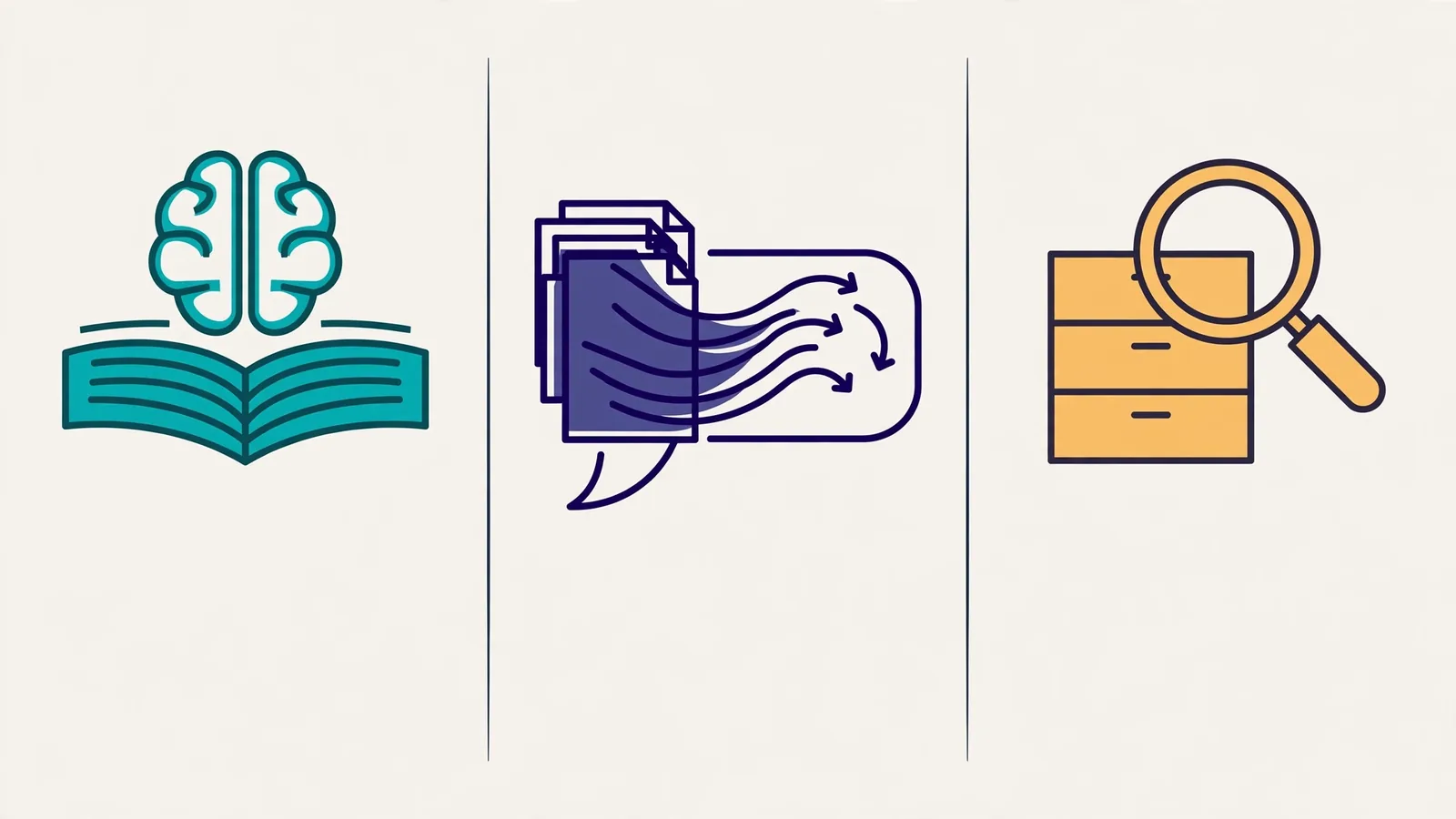
These three techniques get conflated, but they solve different problems.
| Aspect | RAG | Fine-tuning | Prompt Engineering |
|---|---|---|---|
| Problem solved | Answering from external/fresh knowledge | Changing a model's core behavior or knowledge | Steering output through instructions |
| Cost | Low (embeddings + storage) | High (GPUs, training data) | Near zero |
| Changing data | Excellent (just update documents) | Poor (requires retraining) | Neutral |
| Training data needed | No | Yes, hundreds–thousands of examples | No |
| Hallucination risk | Low with good context | Still present | Still present |
| Use it for | FAQs, docs, internal data | Custom tone, domain reasoning | Output format, tone, constraints |
The decision rule is simple: if the needed knowledge can be written down as documents, use RAG. If you need new behavior or capabilities, consider fine-tuning. In production, all three often combine: RAG for knowledge, prompt engineering for format and guardrails, occasional fine-tuning for specialized behavior.
Applied Walkthrough: A Documentation Chatbot at Scale
This section is a composite illustration: a summary of patterns platform teams commonly use when building chatbots over large documentation, not a report on one specific company. Picture a 12,000-page API reference across three versions, with a support team spending half its time answering questions the docs already answer.
The architecture pattern teams typically reach for:
- Ingest: a crawler pulls Markdown from the docs repo on every release; chunking follows heading structure (one section = one chunk, max 800 tokens).
- Metadata: every chunk stores the docs version, page URL, and release date. Queries filter to the latest version unless the user names an older one.
- Retrieval: hybrid search (vector + BM25) fetches 30 candidates, then a cross-encoder reranker picks the best 6.
- Evaluation: 200 real support-ticket questions become a golden set; the metric is answers judged correct by human reviewers.
Two decisions matter most in setups like this. First, version filtering: without it, a large share of answers can cite outdated docs. Second, the reranker, which in many cases lifts accuracy more than switching to a pricier embedding model.
The takeaway: good RAG is data engineering (chunk quality, metadata, and evaluation), not the biggest model. If you build something similar, track three numbers from week one: retrieval recall@k, the share of "I don't know" answers, and the share of answers humans correct.
Common Mistakes and How to Avoid Them
- Sloppy chunking. Cutting exactly 512 tokens mid-sentence destroys context. Use structural boundaries (paragraphs, headings) plus overlap. If answers keep getting cut off mid-thought, chunking is suspect number one.
- No source metadata. Without it you can't show citations, filter by version, or debug wrong answers. Store metadata from day one.
- Top-k too small or too large. K=2 starves the context; K=20 makes prompts noisy and expensive. Start at 4–6, measure, adjust.
- Stuffing whole documents into the prompt. That's not RAG, it's long-context stuffing. Expensive, slow, and models tend to ignore the middle of long contexts (the lost in the middle effect).
- No evaluation. "Looks good to me" isn't a metric. Collect 50–100 question-answer pairs with known-correct answers, run the pipeline against them on every change, and record the scores.
- Blind trust in answers. RAG reduces hallucination; it doesn't eliminate it. For high-stakes decisions, show the sources and let a human verify.
RAG Best Practices for Production
- Evaluate retrieval and generation separately. Measure retrieval with recall@k (is the right chunk in the top K?); measure generation with human or LLM-as-judge answer correctness. When an answer is wrong, you need to know which component failed.
- Give chunks stable IDs. When documents update, you need to know which chunks to replace instead of re-indexing everything from scratch.
- Limit and sanitize input. Cap unreasonably long queries, and never let user PII leak into logged context.
- Cache embeddings for static documents. Embeddings don't change while the text and model stay the same, so there's no reason to recompute them on every deploy.
- Show citations in the UI. Beyond building trust, citations are free debugging: users reporting wrong answers point at the wrong source at the same time.
- Monitor failed queries. Log the questions answered with "I don't know": that's your content roadmap, showing missing documents or chunking that needs fixing.
- Separate indexes per tenant for multi-customer data. Don't rely on metadata filters alone to isolate one customer's sensitive data from another's.
FAQ
Does RAG need a GPU?
Not for a basic pipeline. Embeddings can come from an API (OpenAI, Cohere) or from open-source models running on CPU at small scale. GPUs only matter when you self-host embedding models or rerankers at high volume, or when you fine-tune.
How much does running RAG cost?
At small to medium scale, API calls dominate. A rough example: indexing 10,000 chunks with text-embedding-3-small costs well under one US dollar; each question costs one query embedding plus context tokens for 4–6 chunks (roughly 3,000–4,000 tokens), far cheaper than fine-tuning a model.
Does RAG work for non-English content?
Yes, with two conditions: pick a multilingual embedding model (like multilingual-e5 or bge-m3) and evaluate retrieval in the target language instead of just translating an English eval set. Chunking quality for the language's sentence patterns deserves manual checking too.
How is RAG different from regular search?
Search returns a list of documents; the user reads and synthesizes. RAG goes further: it reads the retrieved documents and composes a direct answer in natural language, with citations. Search is a component inside RAG, not a replacement for it.
When should I move from simple RAG to an advanced architecture?
When your eval metrics plateau. If retrieval recall@5 is above 90% but answers are still wrong, the problem is the generator or the prompt. If retrieval itself is weak, add hybrid search and a reranker before reaching for a bigger model. Measure first, optimize second.
Conclusion
RAG is the most practical way to make an LLM answer from knowledge that is current, private, and verifiable, without the cost and complexity of retraining. The core loop is four steps: split documents into chunks, turn them into embeddings, find the most relevant ones per question, and let the model compose its answer from that context.
The highest-impact next step: build the minimal pipeline from the tutorial above against your own documentation, collect 50 real questions as an eval set, then iterate on chunking and retrieval. RAG quality is almost always decided by its data engineering, not its model size.
To round it out, learn how to write effective prompts for RAG in the prompt engineering guide — because a good RAG generator ultimately comes down to the right instructions.