Playwright vs Puppeteer vs Selenium: Choosing the Right Browser Automation Tool
An in-depth comparison of the three most popular browser automation tools: architecture, strengths, weaknesses, the same code in all three, and a guide to choosing for your project.
Panji Ihsanudin Fajri
14 min read0 reads
Contents
- What is browser automation?
- Why the choice matters more than you think
- The hidden cost of picking wrong
- The three jobs they all do
- Playwright: the newcomer that took the crown
- Puppeteer: the scalpel from the Chrome team
- Selenium: the veteran that refuses to die
- How the three work under the hood
- Head-to-head comparison
- The same code in three styles
- Playwright (TypeScript)
- Puppeteer (JavaScript)
- Selenium (Python)
- Case studies: which tool for your project?
- Common mistakes and how to avoid them
- Best practices across all three
- FAQ
- Is Playwright faster than Selenium?
- Can Puppeteer drive Firefox or Safari?
- Is Selenium outdated in 2026?
- Which tool is best for web scraping?
- Can all three run in CI like GitHub Actions?
- Conclusion
Choosing between Playwright, Puppeteer, and Selenium feels like picking a vehicle for a long road trip: all three will get you there, but the ride, the cost, and the speed differ wildly. Playwright vs Puppeteer vs Selenium is one of the most searched comparisons among developers doing browser automation — whether for automated testing, web scraping, or uptime monitoring.
This article breaks the three down by architecture, not just feature lists. You will see how each one talks to the browser, the same task written in all three, and a practical decision matrix so you don't pick wrong at the start of a project.
Summary: Playwright is the default choice for new projects in 2026 thanks to auto-waiting, multi-browser support, and built-in test tooling. Puppeteer shines for Chromium-specific work in the Node.js ecosystem, especially scraping. Selenium stays relevant for teams with large existing Java/Python suites, cross-OS grid needs, and enterprise compatibility. Picking wrong early usually gets paid for later in flaky tests and months of maintenance.
What is browser automation?
Browser automation means driving a web browser from code: opening pages, clicking buttons, filling forms, reading content, capturing screenshots — all without a human hand. The three dominant uses are automated testing (verifying a web app still works after every code change), web scraping (extracting data from sites), and lightweight RPA (automating boring web-based admin chores).
All three tools in this article solve the same problem, but they were born in different eras with different philosophies. Knowing where each comes from explains why their APIs feel so different in practice.
Why the choice matters more than you think
The hidden cost of picking wrong
A browser automation tool is not just a library — it becomes the foundation of a test suite or scraping pipeline that will live for years. A bad pick shows up as expensive symptoms: tests failing for no clear reason (flakiness), CI execution times ballooning, or a scraper suddenly getting blocked because its browser fingerprint fell behind. Migrating midway almost always means rewriting the entire suite, since the three APIs are mutually incompatible.
The three jobs they all do
Before comparing, align expectations. Every browser automation tool does three things: launch and drive a browser, interact with pages (click, type, navigate), and observe the results (assertions, screenshots, network logs). The difference is in how — the protocol used to talk to the browser, the supported programming languages, and how much housekeeping (waiting for elements, retries, parallelization) the tool handles versus what you write by hand.
Playwright: the newcomer that took the crown
Playwright is built by Microsoft and first released in 2020. Its latest version, Playwright 1.64, shipped on October 7, 2026 with WebMCP support and the locator.within() API — see the official Playwright docs for the full details. In six years it went from "new alternative" to the default pick for automated testing on many teams — a shift that rarely happens this fast in tooling.
Its strengths come in three parts. First, auto-waiting: every action like a click or form fill automatically waits until the element is actually ready (visible, stable, enabled) before executing. This kills most of the manual sleep() calls that cause flaky tests. Second, three browser engines — Chromium, Firefox, and WebKit — behind one identical API, so a single suite can verify cross-browser behavior without rewrites. Third, built-in test tooling: a test runner with parallelization, Trace Viewer for debugging failures (step-by-step recordings with DOM snapshots), codegen for recording interactions into code, and UI mode.
Playwright ships for JavaScript/TypeScript, Python, .NET, and Java. Its architecture is distinctive: test code talks to a native driver over a pipe, and that driver translates commands into each browser's native protocol. This gives Playwright deep control without depending on any single browser protocol.
The downsides? A large install footprint (each browser engine downloads separately, totaling hundreds of megabytes), and for large-scale scraping that needs advanced custom fingerprinting, its control is not as deep as tools designed for that job. It also has no built-in answer for native mobile — that remains Appium or device-cloud territory.
Puppeteer: the scalpel from the Chrome team
Puppeteer was born inside Google's Chrome DevTools team and designed from day one for a single job: driving Chromium over the Chrome DevTools Protocol (CDP) — the same protocol the browser's DevTools panel uses. Its latest release, Puppeteer 25.15.0, landed on October 20, 2026, just a day before this article was written, bundling Chrome 155 — the official changelog lists every change.
Because it speaks CDP directly, Puppeteer offers extremely granular access: network interception, device emulation, service worker manipulation, even Bluetooth emulation in recent versions. For scraping, that means blocking unneeded resources (images, fonts, analytics), rotating proxies per page, and mimicking a real browser with high precision.
Puppeteer is a pure Node.js library — no built-in test runner, no assertion library, no built-in parallelization. You assemble the stack yourself (pairing it with Jest or Vitest for testing), which brings flexibility and full responsibility. The puppeteer-extra ecosystem with its stealth plugin has been mature since 2018 and remains the reference for work that must avoid bot detection.
Its biggest limitation is obvious: Chromium focus. Firefox support exists but is not the priority, and WebKit/Safari is unsupported. If you need cross-browser verification, Puppeteer is not the answer.
Selenium: the veteran that refuses to die
Selenium has automated browsers since 2004. Its latest release, Selenium 4.51, shipped on October 9, 2026, as announced on the official Selenium blog. Its long history is an asset: abundant documentation, community answers for nearly every error you will hit, and massive enterprise adoption.
Selenium talks to browsers through the W3C WebDriver protocol — an official web standard, not a vendor-owned protocol. Any browser implementing WebDriver can be driven: Chrome, Firefox, Safari, Edge. Official bindings exist for Java, Python, C#, Ruby, JavaScript, and Kotlin — the widest language choice of the three.
Two modern developments keep it relevant. Selenium Manager, bundled since 4.6, automatically downloads and manages the matching browser driver — burying the old ritual of manually matching ChromeDriver versions. WebDriver BiDi, a bidirectional protocol built with the browser vendors, is gradually replacing the stopgap CDP access with a cross-browser standard for network interception, logs, and browser events. The Selenium documentation tracks its current status.
Selenium is also the only one with a mature Grid for running thousands of tests in parallel across machines and OS/browser combinations — the classic enterprise and large-scale QA need. Its weakness: a low-level API. No built-in auto-waiting (you write explicit waits yourself), no test runner, and the initial setup feels dated next to Playwright's "just works" experience.
How the three work under the hood
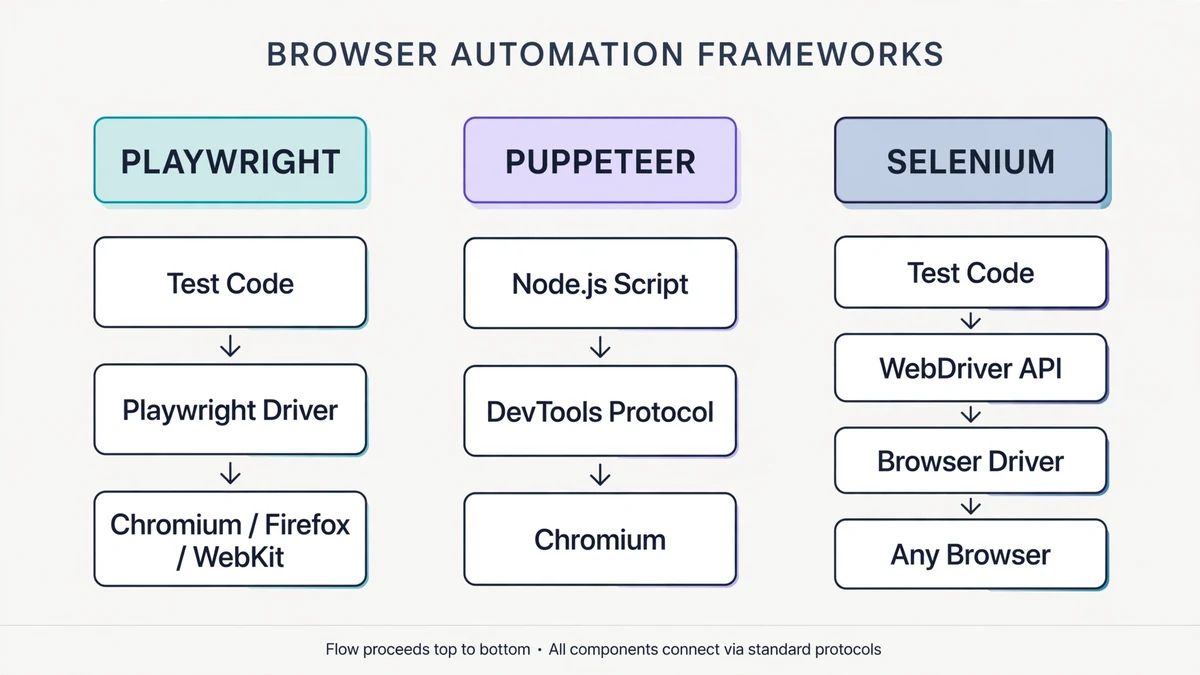
Architectural differences explain behavioral differences. Playwright places a native driver between your code and the browser — the driver speaks each engine's native protocol, so one API stays uniform across three browsers. Puppeteer cuts out the middleman: Node.js code talks straight to Chromium over CDP via WebSocket. Selenium takes the standards route: language bindings turn commands into HTTP requests per the W3C WebDriver spec, received by a browser driver (like ChromeDriver), then passed to the browser.
The practical implications are straightforward. Puppeteer's direct line makes it nimble for pure-Chromium work. Playwright's driver layer adds slight overhead but buys cross-browser uniformity. Selenium's HTTP path is the "longest" distance from the browser — and that is where some of its latency and explicit-wait needs come from.
Head-to-head comparison
| Aspect | Playwright | Puppeteer | Selenium |
|---|---|---|---|
| Maintainer | Microsoft | Google (Chrome DevTools team) | Open-source community |
| First released | 2020 | 2017 | 2004 |
| Latest version (Oct 2026) | 1.64 | 25.15.0 | 4.51 |
| Languages | JS/TS, Python, .NET, Java | JavaScript/TypeScript (Node.js) | Java, Python, C#, Ruby, JS, Kotlin |
| Browsers | Chromium, Firefox, WebKit | Chromium (+ experimental Firefox) | All modern browsers |
| Protocol | Native driver per engine | CDP / WebDriver BiDi | W3C WebDriver (+ BiDi) |
| Auto-waiting | Yes, built in | Partial (new locator API) | No (manual explicit waits) |
| Built-in test runner | Yes (parallel, trace viewer, codegen) | No | No |
| Grid / distribution | Built-in sharding | No | Selenium Grid 4 |
| Install size | Large (multi-engine) | Medium | Light (bindings only) |
| Best for | Modern E2E testing | Scraping & Chromium automation | Multi-language enterprise suites |
The same code in three styles
To feel the difference, here is one identical scenario — logging into a form — written in all three.
Playwright (TypeScript)
import { test, expect } from '@playwright/test';

test('login shows the dashboard', async ({ page }) => {
  await page.goto('https://example.com/login');
  await page.getByLabel('Email').fill('[email protected]');
  await page.getByLabel('Password').fill('secret123');
  await page.getByRole('button', { name: 'Sign in' }).click();
  // Auto-waiting: the assertion waits on its own until the condition holds
  await expect(page.getByText('Dashboard')).toBeVisible();
});
Notice there is not a single manual wait. getByRole and getByLabel use locators that survive small DOM structure changes — a more durable practice than brittle CSS selectors.
Puppeteer (JavaScript)
import puppeteer from 'puppeteer';

const browser = await puppeteer.launch();
const page = await browser.newPage();
await page.goto('https://example.com/login');
await page.locator('#email').fill('[email protected]');
await page.locator('#password').fill('secret123');
await page.locator('button[type="submit"]').click();
await page.waitForSelector('text/Dashboard');
await browser.close();
The modern page.locator API in Puppeteer brings auto-waiting patterns similar to Playwright. With no built-in runner, you wrap scripts like this in a test framework of your choice.
Selenium (Python)
from selenium import webdriver
from selenium.webdriver.common.by import By
from selenium.webdriver.support.ui import WebDriverWait
from selenium.webdriver.support import expected_conditions as EC

driver = webdriver.Chrome()  # Selenium Manager handles the driver automatically
driver.get("https://example.com/login")
driver.find_element(By.ID, "email").send_keys("[email protected]")
driver.find_element(By.ID, "password").send_keys("secret123")
driver.find_element(By.CSS_SELECTOR, "button[type='submit']").click()
WebDriverWait(driver, 10).until(
    EC.visibility_of_element_located(
        (By.XPATH, "//*[contains(text(), 'Dashboard')]"))
)
driver.quit()
The Selenium version is the longest because every wait is written explicitly. Since 4.6 you no longer manage ChromeDriver by hand — webdriver.Chrome() calls Selenium Manager behind the scenes.
Case studies: which tool for your project?
Small SaaS startup, TypeScript stack. Pick Playwright. Five-minute setup, parallel tests out of the box, and Trace Viewer saves hours of debugging every week. This is the scenario where Playwright shines brightest — and why it became the new default.
Competitor price-scraping pipeline, 50k pages a day, Node.js stack. Pick Puppeteer. CDP control allows blocking heavy resources and rotating proxies per browser context, cutting bandwidth and cost. The stealth plugin ecosystem helps on sites that aggressively detect bots.
A bank with 3,000 Selenium Java tests running for five years. Stay on Selenium. Migration cost — rewriting thousands of tests, retraining the QA team, revalidating compliance pipelines — dwarfs the benefit of switching. Gradual modernization (adopt Selenium Manager, move to Grid 4) delivers most of the benefit for a fraction of the effort.
A QA team that must verify Safari on macOS and Edge on Windows. Selenium or Playwright. Playwright's bundled WebKit approximates Safari though it is not genuine Safari; real Safari still needs Apple's WebDriver. Puppeteer is out here.
Synthetic uptime monitoring from many regions. Playwright or Puppeteer — both run headless in containers cheaply. Pair them with a CI/CD pipeline and Playwright's official Docker images.
Common mistakes and how to avoid them
Relying on fixed sleep() calls. The number-one source of flaky tests in every tool. Replace them with condition-based waits: auto-waiting in Playwright, waitForSelector/waitForFunction in Puppeteer, WebDriverWait with expected conditions in Selenium.
Brittle selectors. A selector like div > div:nth-child(3) > button breaks on every small layout change. A safe priority order: accessible roles/labels first, then data-testid attributes designed for tests, CSS/XPath last.
Running everything serially. A 500-test suite that takes two hours will not get run by anyone. Playwright parallelizes out of the box; for Puppeteer and Selenium, split the suite and run it in parallel on CI or Selenium Grid.
Ignoring test isolation. Tests sharing state (one login for all tests, a database never reset) fail mysteriously in sequence. Each test must run on its own — a general principle, just like other TypeScript best practices.
Scraping without respecting the target. Hammering a site with requests, ignoring robots.txt, or aggressively faking identity is not just ethically questionable — practically, your IP gets blocked permanently. Rate-limit yourself, cache aggressively, and read the site's terms of service.
Best practices across all three
- Write tests from the user's perspective, not the implementation's. Test "the user can check out", not "the button with class X is clickable".
- Separate Page Objects or fixtures from assertion logic, so UI changes touch exactly one place.
- Run the critical subset on every pull request, the full suite on a nightly schedule. This strategy is covered further in the CI/CD pipeline guide.
- Store failure artifacts — screenshots, video, traces — automatically in CI. Debugging without artifacts is guessing.
- Pin browser and tool versions in CI. Minor Playwright or Puppeteer releases sometimes change behavior; floating versions make failures hard to reproduce.
- For async Python scraping, the concurrency patterns in the asyncio guide pair well with Playwright Python, which is fully async-native.
FAQ
Is Playwright faster than Selenium?
For equivalent scenarios, generally yes — auto-waiting removes excess delays and its driver architecture sits closer to the browser than WebDriver's HTTP round-trips. But the "faster" that matters most is usually not the tool: it is how parallel your tests run and how efficient your selectors are.
Can Puppeteer drive Firefox or Safari?
Puppeteer supports Firefox experimentally, but Chromium remains its focus. Safari/WebKit is unsupported. If you need both, Playwright or Selenium is the right call.
Is Selenium outdated in 2026?
No — Selenium 4.51 is actively developed, the WebDriver BiDi protocol is catching up on bidirectional features, and Selenium Manager removed the classic driver complaint. It is not the most ergonomic choice for greenfield projects, but for established enterprise ecosystems it remains a solid foundation.
Which tool is best for web scraping?
Puppeteer for heavy Node.js scraping that needs deep browser control. Playwright Python for scraping that needs async concurrency and multi-browser coverage. Selenium is rarely the first pick for new scraping unless the team already masters it. All three lose to a plain HTTP client for sites that don't need JavaScript — don't use browser automation for a job curl can do.
Can all three run in CI like GitHub Actions?
Yes. Playwright ships official Docker images and a GitHub Action; Puppeteer needs Chrome's system dependencies installed on the runner; Selenium is most comfortable via Selenium Grid or standalone Docker images. The pipeline patterns are detailed in the CI/CD guide.
Conclusion
There is no absolute winner — only the tool that best fits your context. Playwright is the safe starting point for almost every new project in 2026: best ergonomics, multi-browser, complete tooling. Puppeteer is the precision choice for Chromium/Node.js work, especially scraping. Selenium is the proven long-term investment for organizations with multi-language, multi-OS, and Grid-scale needs.
The practical rule: starting from zero, start with Playwright and move only for a concrete reason. If you already have a suite that runs well, modernizing in place is almost always cheaper than migrating. And whatever you pick, selector discipline and test isolation decide success far more than the logo on the tool's documentation.
Next step: pick one small scenario from your own app — a login flow, say — write it in your chosen tool, run it in CI, and feel the difference yourself before committing to hundreds of tests.